
First Steps with Agent Interaction
Your First Conversation with the Agent
Let's dive into practical, hands-on experience with the Digicust Agent. This chapter walks you through real scenarios you'll encounter in your daily customs work.
Scenario 1: Processing Your First Invoice
Imagine you receive a commercial invoice from a supplier in Germany with 15 line items of electronic components. Here's how the conversation with the agent would unfold:
🗣️ Your Request
"I've received this invoice from ABC Electronics GmbH. Please process it and extract all the product information for our import declaration."
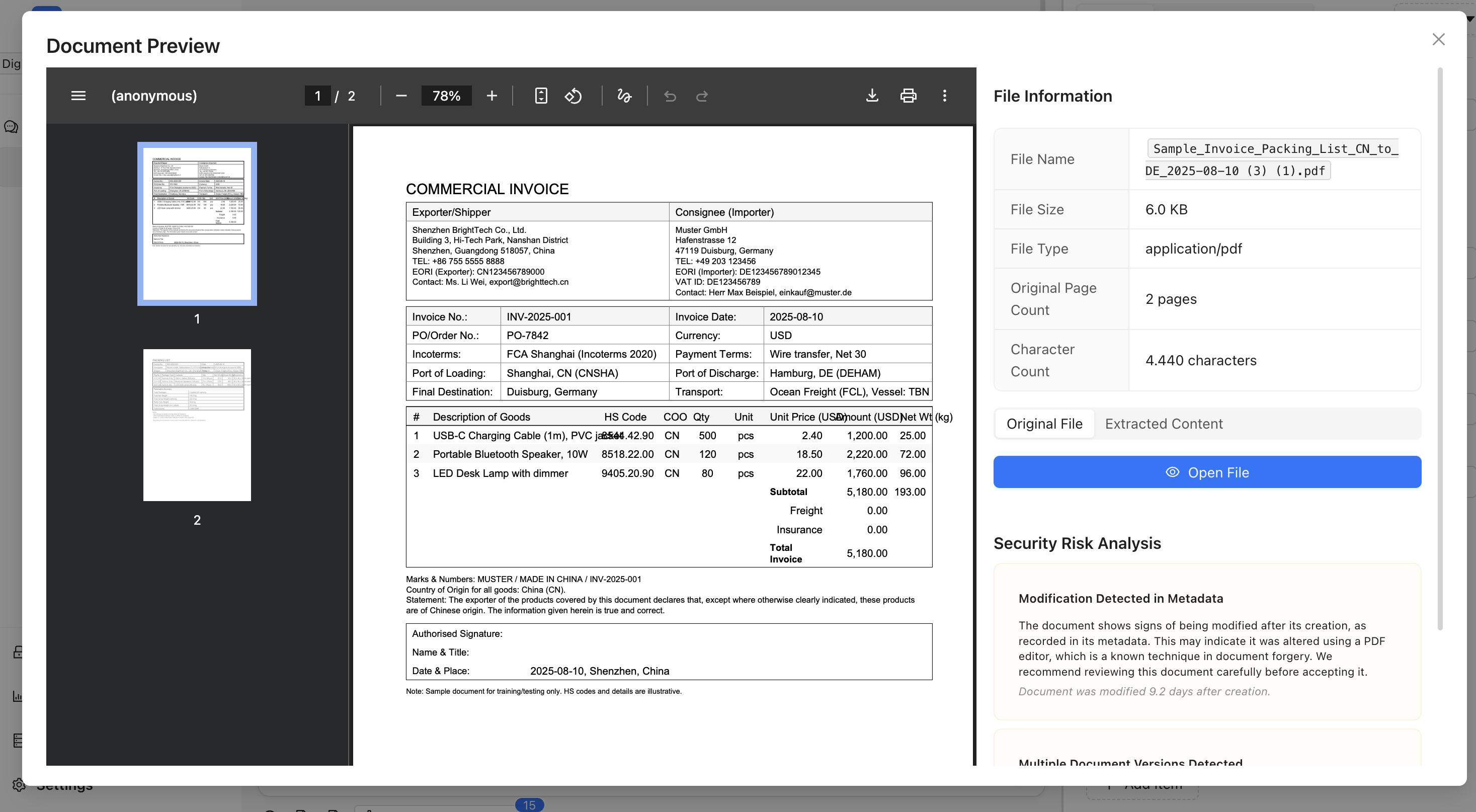
Above: The agent automatically processes uploaded documents, recognizing formats and extracting structured data.
🤖 Agent Response & Actions
The agent immediately springs into action, automatically using multiple tools:
- Document Reader Tool - Extracts text, recognizes tables, processes product descriptions
- Master Data Search Tool - Looks for existing supplier information in your database
- Web Search Tool - Researches current duty rates and any recent regulatory changes
- Customs Tariff Number Tool - Validates HS codes and provides detailed descriptions
📊 What You Get Back
✅ Document processed successfully!

Extracted Information:
• Supplier: ABC Electronics GmbH (found in master data - tax ID: DE123456789)
• Invoice Date: 2024-01-15
• Total Value: €12,450.00
• 15 line items processed
• All tariff codes validated
• Duty calculations completed

Key Findings:
• 3 line items had outdated HS codes - corrected automatically
• Supplier address updated with latest information
• Electronic components qualify for EU origin preference
• Estimated total duties: €623.25 (5% average)

Next Steps:
Would you like me to:
1. Create the import declaration now?
2. Update master data with the new product information?
3. Check for any export control requirements?
Scenario 2: Master Data Enhancement
Now let's see how the agent helps manage your organizational knowledge:
🗣️ Your Request
"This supplier has provided updated company information. Please find them in our master data and update their details with the new information from this certificate."
[You upload a business registration certificate]
🤖 Agent Response & Actions
- Document Reader Tool - Extracts company name, registration numbers, addresses
- Master Data Search Tool - Finds existing supplier records using fuzzy matching
- Number Validation Tool - Verifies tax IDs and EORI numbers
- Master Data Update Tool - Enhances existing records with new information
📊 Results
✅ Master data updated successfully!

Found: ABC Electronics GmbH (ID: supplier_12345)
Confidence: 95% match

Updates Applied:
• Address: Industriestr. 123, 40474 Düsseldorf → Neue Str. 456, 40479 Düsseldorf
• VAT Number: Verified active (DE123456789)
• Phone: Added +49-211-555-0123
• Registration: Updated expiry date to 2026-12-31
• Contact Person: Added Max Mustermann (Purchasing Manager)

Historical Context:
• 156 transactions totaling €2.4M over 3 years
• Last transaction: 2024-01-10
• Payment performance: Excellent (30-day average)
• AEO Status: Verified authorized economic operator
Scenario 3: Complex Tariff Research
Here's how the agent handles complex classification questions:
🗣️ Your Request
"We're importing a new smart home device that combines a security camera, Wi-Fi router, and environmental sensors. What's the correct tariff classification, and are there any special requirements?"
🤖 Agent Response & Actions
- Web Search Tool - Researches current regulations for smart home devices
- Tariff Classification Tool - AI-powered analysis of the multi-function device
- Export Control Tool - Screens for dual-use technology restrictions
- BTI Search - Looks for existing binding tariff information decisions
📊 Analysis Results
🔍 Classification Analysis Complete

Primary Classification: 8517.62.00 (Machines for reception, conversion and transmission)
Confidence: 78%

Reasoning:
The device's primary function is Wi-Fi routing/networking. Camera and sensors are auxiliary features that enhance the main networking capability. Under GIR 3(a), classified by essential character.

Alternative Considerations:
• 8525.80.00 (Television cameras) - 15% confidence
• 9031.80.00 (Measuring instruments) - 7% confidence

Special Requirements Found:
✅ EU cybersecurity requirements (RED Directive)
✅ WEEE compliance for electronic waste
⚠️  Export control screening: Low risk dual-use components detected

Recommended Action:
Proceed with 8517.62.00 classification. Consider obtaining BTI decision for future shipments of this product line.
Understanding How Agent Tools Work Together
Notice how in each scenario, the agent used multiple tools automatically:
🔄 Automated Workflow
- Document Upload triggers Document Reader
- Entity Recognition triggers Master Data Search
- Unknown Information triggers Web Search
- Classification Questions trigger AI Classification tools
- Updates Needed trigger Master Data Update
- Final Results update Case Information
🛠️ Tool Categories You've Seen
- Information Gathering: Web search, master data search, BTI research
- Data Processing: Document reading, JavaScript calculations, validation
- Compliance: Export control screening, number validation, regulatory checks
- Integration: Master data updates, case management, system connections
Best Practices for Effective Communication
✅ Effective Requests
✅ "Process this consolidated invoice with 3 suppliers and create separate import declarations for each."

✅ "Find the tariff classification for this industrial sensor that measures temperature, humidity, and air pressure."

✅ "Update our supplier master data with information from these registration documents."
❌ Less Effective Requests
❌ "Process document" (too vague)

❌ "Run classification tool on product" (don't specify tools)

❌ "Fix the data" (unclear what needs fixing)
💡 Communication Tips
- Be Conversational: Talk to the agent like a knowledgeable colleague
- Provide Context: Explain the business situation and your goals
- Be Specific: Include relevant details about products, suppliers, destinations
- Ask Follow-up Questions: The agent remembers context and can build on previous work
- Give Feedback: The agent learns from your corrections and preferences
Iterative Refinement Process
The agent's power comes from conversation. Here's a typical refinement cycle:
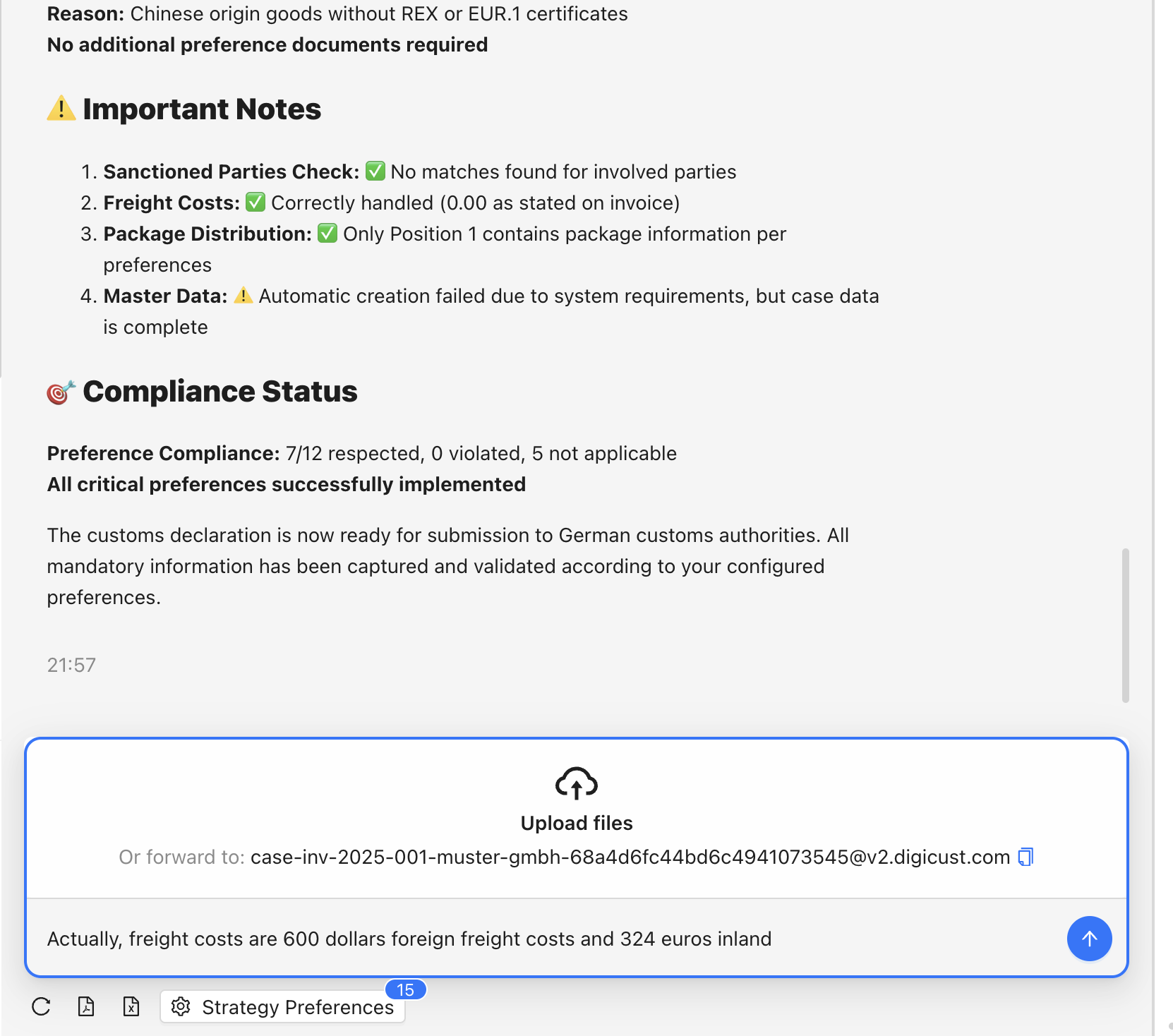
Above: Real agent conversation showing the natural back-and-forth refinement process.
Initial Request
"Process this invoice for import declaration"
Agent's First Response
"I've extracted 45 line items. I notice 3 products have very generic descriptions. Should I enhance them with more detailed customs descriptions?"
Your Refinement
"Yes, please enhance the descriptions. Also, this shipment is going to our warehouse in Hamburg, not Berlin as shown in our default settings."
Agent's Updated Response
"Perfect! I've enhanced the product descriptions using our master data and AI analysis. I've also updated the destination to Hamburg and recalculated the local charges. The declaration is now ready for submission."
What Happens Behind the Scenes
While you're having a natural conversation, the agent is:
- Monitoring tool usage limits to optimize processing
- Maintaining audit trails for compliance purposes
- Learning your preferences for future interactions
- Cross-validating information across multiple sources
- Preparing integrations with your existing systems
- Generating documentation for regulatory requirements
Common First-Time Questions
"How do I know what the agent can do?"
Just ask! The agent understands customs terminology and can explain its capabilities for any specific scenario.
"What if the agent makes a mistake?"
Simply point out the error and the agent will correct it. Each correction helps improve future processing.
"Can I see what tools were used?"
Yes, the agent can explain its decision-making process and which tools were used for any task.
"How do I get the best results?"
Be conversational, provide context, and don't hesitate to refine your requests through continued conversation.
Ready for More Advanced Features?
You've now experienced the core interaction patterns with the Digicust Agent:
- Natural language conversation interface
- Automatic tool selection and coordination
- Intelligent document processing and data extraction
- Master data management and enhancement
- Real-time regulatory research and compliance checking
- Iterative refinement through continued conversation
In the next chapter, we'll dive deeper into the agent's powerful tool ecosystem and learn about advanced features that can transform your entire customs operation.
The key takeaway: Stop thinking about individual tools and start thinking about intelligent conversations that accomplish your customs goals.